Secure Your Digital World with Zunoy Authenticator!
Protect yourself from hackers and account takeovers. Go beyond the password with the free authenticator that works instantly—no account needed.


No Signup
Optional cloud backup
Works Offline
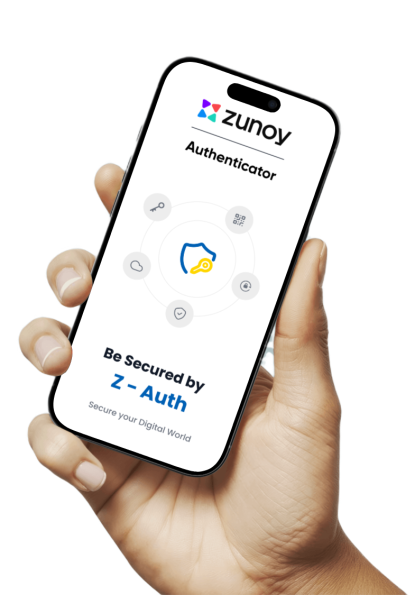
Your Security, Your Choice.

No Account Needed
Install and generate OTP codes offline. Nothing to create, nothing to learn.
Get Started in Seconds
No sign-up
Offline first
Minimal setup
Sign In for Benefits
Turn on encrypted cloud backup, multi-device sync, app sessions, and easy restore.
Never lose your codes
Multi-device Sync
Manage sessions
One-tap delete
Why Your Passwords Aren't Enough
A password is just one key. Two-factor authentication (2FA) adds a second, unique key that changes every 30 seconds. It's the simplest way to block over 99% of automated attacks, and an authenticator app like Zunoy is the most secure way to use it.

Stop Account Takeovers
Renders stolen passwords useless. Hackers can't access your account without your unique, temporary code.

More Secure Than SMS
Avoids SIM-swapping attacks. Codes generate offline on your device, not sent via vulnerable text messages.

Universal Protection
Works with any service that supports 2FA: your email, bank, social media, and work apps.
Ready for a Smarter Authenticator?


Set up any account in under 2 minutes
Recover your codes instantly if you lose your device
Use seamlessly across your iPhone and iPad
Works 100% offline
How Zunoy Keeps You Secure
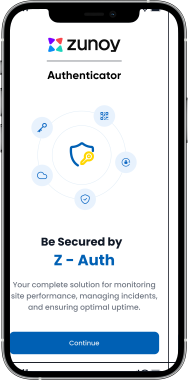
Step 1 : Download the App
Install the free app from the App Store or Google Play—no sign-up required.
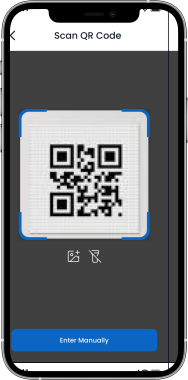
Step 2 : Scan the QR Code
Point your camera at any service's 2FA QR code. Zunoy adds it instantly.
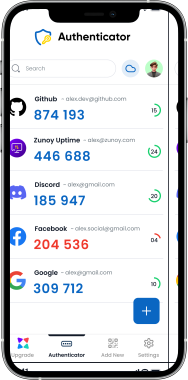
Step 3 : Use Your Code to Log In
Get 6-digit TOTP codes that refresh every 30 seconds. Works entirely offline. Download Now
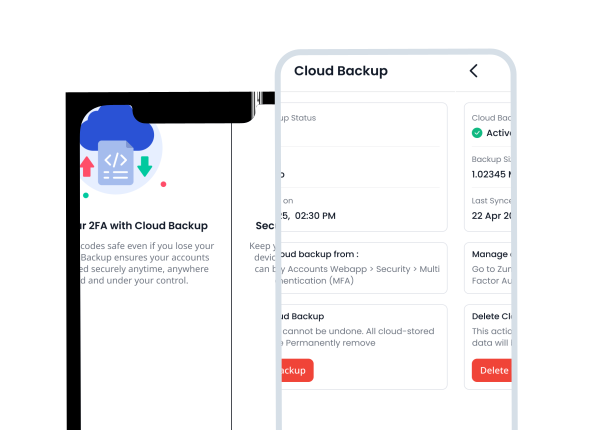
Cloud Sync
Never Lose Your 2FA Codes.
Your phone isn't invincible. Enable encrypted cloud backup to sync your codes across all your devices and recover instantly from loss or theft.
End-to-End Encrypted Backup
Sync Across All Your Devices
Instant Recovery for Lost Phones
Your Data, Always in Your Control
Post-Login Benefits
Everything you need to stay secure, backed up, and in control — all in one place.
Encrypted Cloud Backup
Your codes are encrypted on your device before syncing. We never see your secrets—only you hold the keys.
End-to-end encryption
Recover your accounts if you lose your phone
Your keys remain yours alone
One-tap delete



Your privacy is non-negotiable. Here’s how we protect it.

Local-First & Encrypted
Your codes are generated and stored securely on your device first. We never see them.

Proactive Risk Warnings
We alert you if your device has jailbreak, root, or USB debugging enabled—before you use the app.

Biometric Protection
Lock the app with Face ID, Touch ID, or your fingerprint. You control access.

Screenshot Control
Prevent screenshots within the app to stop codes from being saved to your camera roll.

Optional Cloud Backup
Backup is off by default. If you enable it, everything is encrypted before it leaves your device.

Your Data, Your Control
Export your data anytime. We don’t log your secrets or events. True zero-knowledge design.
See the Difference
| Breakdown of Features |  Zunoy Authenticator |  Google Authenticator |  Microsoft Authenticator |
|---|---|---|---|
Encrypted Sync | Yes (End-to-End Encrypted) | No | No |
Flexible Dashboard | Yes (cards/list, icon/code/email focus) | No | Limited |
Notifications Hub | Backup & Login Alerts for Zunoy Accounts | No | No |
Multi-Device Session Management | View & Revoke Sessions | No | No |
Direct Export | Full Import/Export | Yes | No |
Start without an account | Yes | Yes | Yes |
Works 100% Offline | Yes | Yes | Yes |
Frequently Asked Questions
Is Zunoy Authenticator free?
Do I need an account to start?
How is Zunoy different from Google Authenticator?
Will you see my codes or secrets?
What happens if I lose my phone?
Ready to Experience Zunoy?
Start your journey with Zunoy’s powerful suite of tools, designed for startups, developers, and growing teams alike.

Authenticator
Protect your accounts with Zunoy Authenticator – a secure 2FA app with cloud backup.
Operational
Contact Us On
Mail Us
support@zunoy.comCopyright © 2026 - Mentcube Innovations Pvt Ltd.. All Rights Reserved.