Never Lose Your 2FA Codes Again.
Device loss shouldn't mean lockout. Zunoy Cloud adds encrypted backup & seamless sync across all your devices.


What Is Cloud Sync?
Cloud Sync securely backs up your 2FA codes to the cloud, then keeps them synchronized across all your devices. It’s your safety net against losing access to your accounts.

Use Across Devices
Your codes are automatically available on your phone, tablet, and computer.

Never Get Locked Out
Restore your codes instantly on a new device if you lose your phone.

Get a new phone
Just log in to Zunoy on your new device and your entire authenticator setup is restored in seconds.
How to Enable Cloud Sync
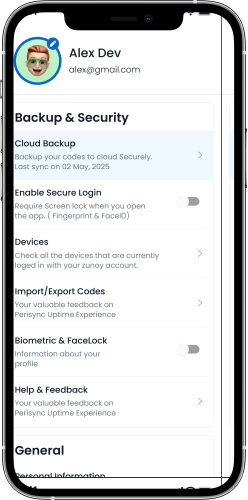
Step 1 : Open Zunoy → Go to Settings
Launch the app and navigate to your account settings.
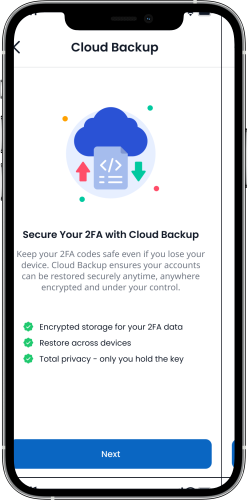
Step 2 : Choose Enable Cloud Sync
Select the option to turn on encrypted backup.
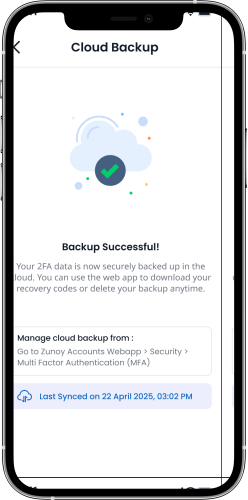
Step 3 : Set Your Encryption Password
Create a personal password to secure your data—this encrypts your codes before they sync.
Your Personal Encryption Key
Your Personal Encryption Key is the master password that protects your cloud backup. It ensures that only you can access your synced codes—not even Zunoy can recover it.
How it works:

Total control over your data. Delete your encrypted cloud backup anytime - instantly.

Deletes cloud copy only
Instant & irreversible
Return to local-only mode
Frequently Asked Questions
What is Cloud Sync?
Cloud Sync securely backs up your 2FA codes to the cloud and keeps them synchronized across all your devices, so you're never locked out if you lose your phone.
How do I enable Cloud Sync?
Open the Zunoy app, go to Settings, choose Enable Cloud Sync, and set your Personal Encryption Key. Your codes are encrypted on your device before they ever leave it.
What is the Personal Encryption Key, and can Zunoy recover it if I forget it?
Your Personal Encryption Key is the master password that protects your cloud backup. You create it, and only you can decrypt your synced codes — not even Zunoy can read or reset it, so if you forget it, your backup cannot be recovered.
What happens if I lose my phone or get a new device?
Log in to Zunoy on your new device and enter your Personal Encryption Key — your entire authenticator setup, including all 2FA codes, is restored in seconds.
Is my data encrypted?
Yes. Your codes are encrypted on your device using your Personal Encryption Key before they're ever uploaded, so Zunoy never has access to your unencrypted 2FA codes.
Ready to Experience Zunoy?
Start your journey with Zunoy's powerful suite of tools, designed for startups, developers, and growing teams alike.

Authenticator
Protect your accounts with Zunoy Authenticator – a secure 2FA app with cloud backup.
Operational
Contact Us On
Mail Us
support@zunoy.comCopyright © 2026 - Mentcube Innovations Pvt Ltd.. All Rights Reserved.