Your Note. Your Website. One Click.
Turn any note into a live webpage without touching a single line of code.
Custom domain (Pro/Team)
SEO controls
Google Analytics (Team)
No code needed
WHAT IT IS
Most notes apps stop at the editor. Zunoy Notes doesn't.
Write something worth reading — then put it in front of the people who need to read it. Every note is a potential webpage, live in one click, fully yours.
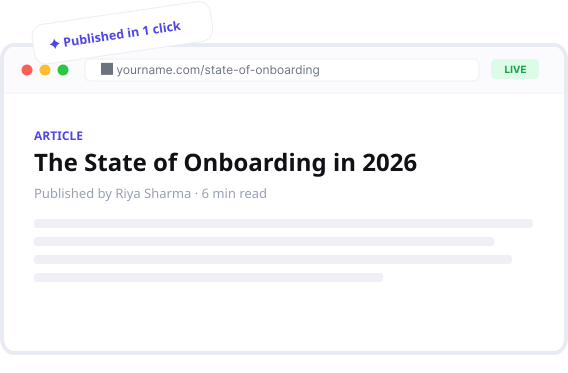
If you write, you should be publishing.
One platform. Every kind of writer.

Writers
Publish essays, articles, drafts, and personal blogs straight from your notes. Share a polished piece without ever opening a CMS, formatting an export, or setting up a separate site.

Researchers
Turn findings, reports, references, and ongoing research into a clean public page anyone can open in a browser. No PDF to attach, no formatting to fight, no outdated file floating around in someone's downloads.

Teams
Publish wikis, handbooks, changelogs, onboarding docs, and internal knowledge bases. Every page stays live and current — update the note once, and everyone viewing the link sees the latest version automatically.

Freelancers
Share proposals, assignments, contracts, and ongoing client work as a single live link. No re-sending files after every edit, no version confusion over email — your client always sees the most current version, the moment you update it.
One click. Your note is now a webpage.
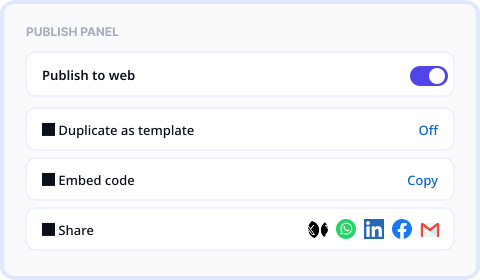
Hit publish, and your note goes live instantly — no setup, no exporting, no waiting.

Publish to web
Any note goes live instantly with a shareable link.
Duplicate as templatE
Let others copy your page as their own starting point.
Embed
Drop your note into any website that accepts an embed.
Share via social
One-click sharing straight from the publish panel.
Customization
Looks like you. Not like everyone else.
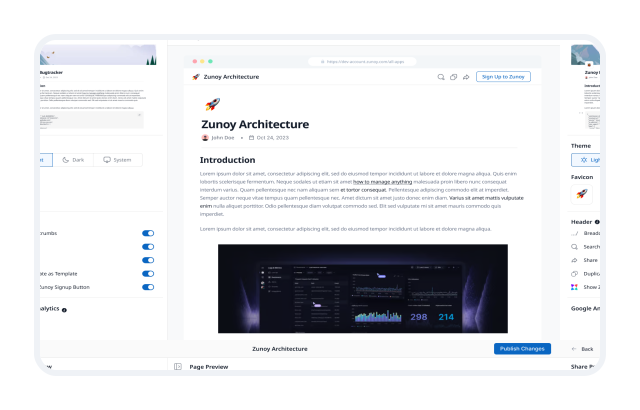
Every published page is yours to style — no templates forced on you.
Custom styling — Layout, spacing, visual tone — all adjustable.
Typography — Fonts that fit your content, not a default you're stuck with.
Full width mode — Let your content breathe across the full screen.
Custom domain — Publish at yourname.com instead of a Zunoy URL.
Dark / light / system mode — Your page, your appearance.
Custom favicon — Your brand in the browser tab.
Password protection — Publish privately, share selectively.
Auto expiry — Set it to unpublish itself automatically.
SEO & Analytics
Write it. Publish it. Get found.
Full SEO control and real analytics — built into every published page.
Index / no-index — Choose what Google can see, per page.
SEO preview — See exactly how your search result looks before you publish.
Link title & description — Write your own meta per page.
Link title & description — Write your own meta per page.
Google Analytics — Connect GA4 and track every published page. · Team plan

Every page. One view.
All your published pages, their status, and their performance — in one place.
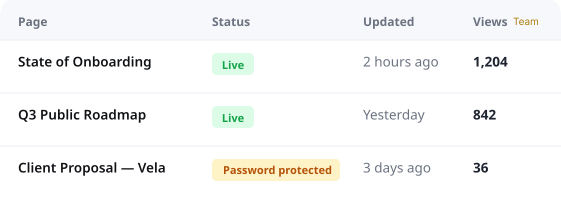

Published pages dashboard
Every live page, its status, and when it was last updated.
Manage sites & links
Update, unpublish, or duplicate any page from one place.
Analytics at a glance
Views, traffic, and engagement across all live pages. · Team plan
Questions worth answering.
Do I need to know how to code to publish a page?
Not at all. Write your note, hit publish, and it's live. No HTML, no CSS, no developer needed — Zunoy handles everything in the background so you can focus on the writing.
Can I use my own domain?
Yes — you can link your own custom domain so your published notes live at yourname.com or blog.yourcompany.com instead of a Zunoy URL. Custom domain is available on Pro and Team plans.
Can I password protect a published page?
Yes — every published page can be password protected so only people with the link and the password can view it. Great for sharing drafts with clients or keeping internal docs semi-private.
Will my published pages show up on Google?
Only if you want them to. Zunoy gives you full index and no-index control per page — so you decide exactly what Google can find and what stays off search entirely.
Can I unpublish a page at any time?
Yes — unpublish any page instantly from your dashboard with one click. You can also set an auto expiry date when you publish, so the page takes itself down automatically without you having to remember.
Is Google Analytics available on all plans?
Google Analytics integration is available on the Team plan. On Free and Pro you still get Zunoy's built-in page analytics — views and basic engagement — just without the GA4 connection.
You wrote something worth reading. Time to let people read it.
No code. No CMS. No extra tool. Just your note — live, beautiful, found.


Notes
Zunoy online notes helps you capture every idea, organise the knowledge behind it.
Operational
Contact Us On
Mail Us
support@zunoy.comCopyright © 2026 - Mentcube Innovations Pvt Ltd.. All Rights Reserved.