Bug Reporting Channels for Every Team Workflow
Zunoy brings Slack, email, Chrome extension, mobile app, API, webhooks, Microsoft Teams, Discord, web app, and an in-app bug report widget into one structured bug reporting workflow. Report bugs from multiple channels and keep every issue connected to the context developers and QA teams need to triage, assign, and resolve faster.

Free To Start
Multi-Channel Reporting
Visual Bug Reporting
No Credit Card Needed
Rich Context for Bugs
THE PROBLEM
Bugs Don’t Start in Dashboards
Bugs appear during QA testing, customer calls, mobile checks, website reviews, production use, and team discussions, but most reports stay scattered across chats, emails, screenshots, spreadsheets, and support threads.
Problem Points:

Screenshots get separated from bug details
Device context is missed during handoff
Reproduction steps are added too late
Ownership stays unclear across channels
Developers chase missing information
Bugs get buried before triage
WITHOUT ZUNOY
WITH ZUNOY
WITHOUT ZUNOY
WITH ZUNOY
COLLABORATIVE REPORTING CHANNELS
Capture bugs from the conversations your team already uses every day.
Slack
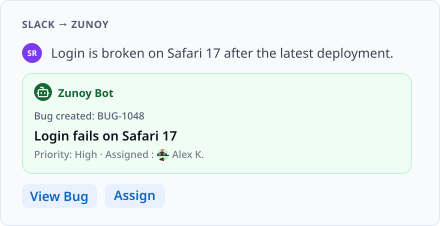
Bugs often start inside Slack as quick messages, screenshots, QA updates, or support escalations. With the Zunoy BugTracker bot, teams can turn those conversations into structured bug reports before they disappear in fast-moving channels. Each report can move into Zunoy with ownership, status, and follow-up visibility.
MS Teams
For teams working in Microsoft Teams, Zunoy helps convert release blockers, shared files, QA updates, and issue discussions into trackable bugs. Instead of manually copying details from Teams into a bug tracker, teams can move the conversation into a proper workflow with status, assignee, and resolution tracking.

Discord
Discord is useful for beta communities, support servers, developer groups, and internal teams. Zunoy helps capture reported issues from Discord and route them into the bug workflow, so community feedback does not stay scattered across channels and threads.

Customer issues, support threads, QA notes, and external bug reports often arrive through email. Zunoy turns those emails into tracked bugs while keeping the original thread, attachments, reporter details, and context connected to the issue.

Visual Bug Reporting
Capture bugs with screenshots, page context, browser details, device data, and visual evidence.
In-App Bug Report Widget
The widget lets users, testers, clients, and QA teams report bugs directly from your website or app while the issue is still on screen. It is built for high-context reporting, so teams can capture page context, screenshots, comments, user details, and visual feedback without asking reporters to explain everything later.
Mobile Bug Reporting
Mobile bugs are easier to capture when testers can report them from the device they are using. With the Zunoy Bug Tracker mobile app, teams can report bugs, add screenshots, include device context, assign owners, comment, and update status from anywhere.
Web App Reporting
The Zunoy Bug Tracker dashboard gives teams a structured way to create detailed bug reports manually. QA, developers, product teams, and support teams can add severity, priority, assignee, tags, attachments, reproduction steps, and status before the bug moves into the workflow.
Chrome Extension
The Chrome extension helps QA teams, product reviewers, and frontend testers report browser bugs from the page they are testing. Capture screenshots, page URLs, browser details, and notes in a few clicks, then send the issue into Zunoy for triage and assignment.


CREATION CHANNELS
API For Bug Reporting
Use the bug reporting API to create bugs from CI/CD pipelines, monitoring tools, crash logs, test automation, internal dashboards, or custom systems. Technical signals can become structured bug reports without waiting for manual entry.
Ready to Test Safely? Create your first Bug reporting channel in 60 seconds!


5+ Reporting Channels
AI Support for Bug Reporting
Setup in 60 seconds
One Dashboard for all the Bugs
WHY THIS IS DIFFERENT
Bug Reports with Context, Not Just Text

Visual proof
Screenshots, files, and attachments show what happened.

Technical context
Browser, device, and page details show where it happened.

Reproduction details
Steps, comments, and expected behavior show how to repeat it.

Workflow metadata
Severity, priority, owner, status, and tags make every report ready for triage.
Every channel creates the same outcome: fewer incomplete tickets, faster triage, clearer ownership, and better bug resolution.
Make Your Own Product Report Bugs
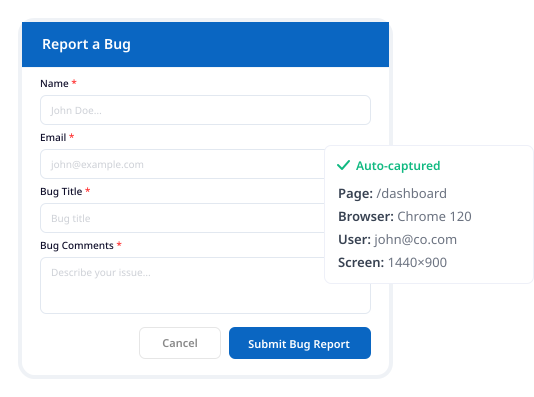
Zunoy Bug Tracker's in-app bug report widget lets users, testers, and clients report issues from inside your website, app or portal. Reports can carry page context, comments, user details, and visual evidence where supported, then move into the right bug tracking workflow.

Report Inside the Product
Capture bugs where users actually experience them.

Keep Page Context
Add page-level details so teams know where the issue happened.

Route to Bug Tracker Dashboard
Send widget reports into the right project for triage and ownership
How Teams Report Bugs From Multiple Channels
Zunoy helps QA, support, product, and engineering teams capture bugs from the places where they are actually found.
Got Questions About Reporting?
What are bug reporting channels?
Bug reporting channels are the different ways teams submit bugs into a bug tracker, such as Slack, email, Chrome extension, mobile app, website widget, API, Microsoft Teams, Discord, or webhooks.
Which bug reporting channels does Zunoy support?
Zunoy Bug Tracker supports bug reporting through Slack, email, Chrome extension, mobile app, in-app widget, API, webhooks, Discord, Microsoft Teams, and the web app.
What is a multi-channel bug reporting tool?
A multi-channel bug reporting tool lets teams report bugs from multiple sources and manage them in one bug tracking workflow.
More Than Just a BugTracker
Zunoy is a developer & Productive Suite to build, ship, and monitor your apps. -so your tools share a workspace, a team, and a login. No more juggling multipe different dashboards


All our products come with a Lifetime Free tier.

The All-in-One SaaS Suite
One platform, one seamless experience. Everything you need to build, test, ship, and manage your team—with zero friction.
Operational
Free Tools
Mail Us
support@zunoy.comCopyright © 2026 - Mentcube Innovations Pvt Ltd.. All Rights Reserved. v0.1.0
CIN: U62090KA2025PTC197958
Dun & Bradstreet's DUNS Number: 772647201