We built an Email Client.
For emails that should never arrive.
Most sandboxes dump your emails into a raw text view. Zunoy Email Inbox is a full inbox — HTML rendering, AI scoring, failure simulation because the only way to know your email is right is to see it exactly the way your user will.
Works with Node.js · Python · PHP · Laravel · Django · Rails · Any SMTP or REST client
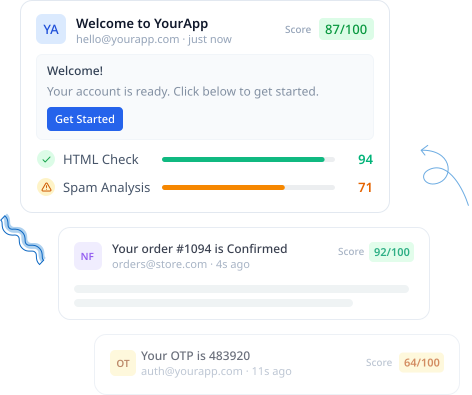









Email bugs are the quietest kind. Until they're not.
You Sent It. You Never Saw It.
Your email went out. Your code returned success. But you have no idea if it rendered correctly in Gmail, Outlook, or on mobile — because you never actually looked at it.
Spam. Found Out From a User.
Your welcome email has been landing in spam for two weeks. A support ticket told you. Your tools told you nothing. By then, hundreds of signups never saw it.
Happy Path Only.
Your email handler has never seen a bounce, a timeout, or a server error. It will — just not until you're in production, with real users on the receiving end.
Real Users. Test Emails.
QA is testing with real addresses. Occasionally a real user gets a test notification. Nobody catches it until someone replies asking what's going on.
Email Inbox catches every one of these — before they become a Tuesday morning problem.
WHAT IS EMAIL INBOX
A real inbox for emails your app sends in development and staging
Zunoy Email Inbox is an email testing tool and SMTP sandbox that lets you capture, inspect, and debug emails without sending them to real users.
Built for developers who need more than a raw text dump — HTML rendering, AI scoring, failure simulation, and a full inspection suite in one place.

Each inbox is fully isolated
Its own SMTP credentials. Its own API endpoint. Create one for dev, one for staging, one for QA — nothing shared.

Connects in one Config Change
SMTP or REST API. Swap one environment variable. Your templates, sending logic, and header stay exactly the same.

Your whole team sees every email
The moment an email arrives, every team member sees it in real time. No more "did the email arrive?" over Slack.
BUILT FOR
Who uses Email Inbox

Backend Developers
Testing transactional email flows — OTPs, confirmations, resets.

QA Teams
Validating email delivery, rendering, and content across test runs.

Startups
Building signup, OTP, and notification systems without a real provider in staging.

Teams Migrating
Replacing staging tools like Mailtrap or Mailosaur with a richer alternative.
Four Steps to your First Captured Email
Create an inbox
Every inbox gets its own unique SMTP credentials and API endpoint — isolated from every other inbox. Name it by environment: dev, staging, QA, or client. Each one is a sealed environment from the moment it’s created.
Connect your app
Swap your real email provider’s SMTP config or API endpoint with your Zunoy inbox credentials. Connections are secured by default. Everything else — your templates, sending logic, headers — stays exactly the same.
Send from your app
Trigger any flow that sends an email — signups, password resets, OTPs, order confirmations. Your app fires the request exactly as it would in production.
Inspect, score, simulate, debug
Every email appears in your inbox instantly. View the HTML render, check the score, inspect raw headers, preview attachments — all from one place. Your whole team sees it simultaneously.
SMTP or API. Your stack, your choice.
Both methods land in the same inbox. Use whichever fits your existing stack — no functional difference.
SMTP - Drop into any existing Email Stack
REST API - HTTP-based sending for any stack
SMTP CONFIG
Code
const transporter = nodemailer.createTransport({
  host: 'mock-smtp.zunoy.com',
  port: 8136,
  secure: true,
  auth: { user: process.env.ZUNOY_SMTP_USER, pass: process.env.ZUNOY_SMTP_PASS },
});
THE INBOX
Not just a message list. A full email inspection suite.
Every email that lands is fully inspectable — across every format, every client, every detail your app included.

HTML preview
See exactly how your email renders in Gmail, Outlook, Apple Mail, and mobile — before it reaches a single inbox.

Multiple view formats
Switch between HTML source, plain text, raw headers, and full SMTP transaction info including MAIL FROM and RCPT TO.

Attachment preview
Every file your app attaches is previewable inline. Download any attachment directly from the inbox.

Advanced search
Search by sender, subject, date, tag, or folder. Find the right email across hundreds of test messages without scrolling.

Public link generator
Generate a read-only link for any email. Share with a stakeholder or client — no Sandbox account needed.

Download options
Export any email as .eml, .pdf, or .html — for archiving, bug reports, or sharing rendered output outside your team.
Ready to test safely? Start your
free sandbox in under 60 seconds.


One Single Tool for - Email + SMS + Webhook + TOTP
Maintain customer trust - Test Alerts before your Users do
Setup under 5 minutes
Real human support by Zunoy Team
Don't just receive emails.
Know if they'll actually work
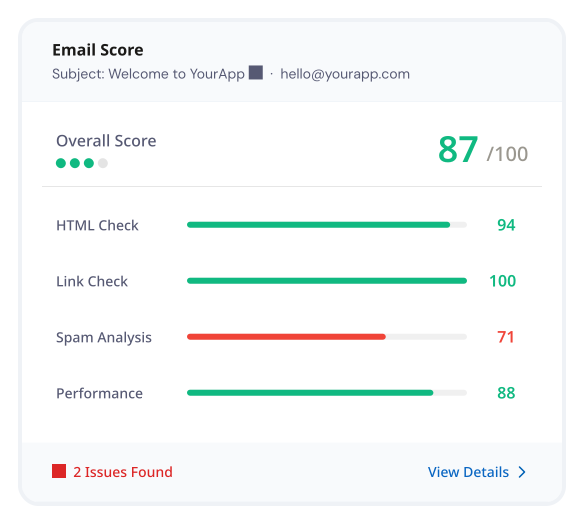
Every email that hits your Sandbox inbox gets automatically scored across five dimensions — so you catch deliverability issues, broken links, and spam triggers before your users do.
HTML Check
Link Check
Spam Analysis
Performance Score
AI Score

Send specific emails to a real inbox when you need to
Pre-verify a destination address once. Then forward manually — or automatically using rules.
Manual Forwarding
Click any email and forward it to a pre-verified address. Useful for sharing a specific test email with a stakeholder, designer, or client who needs to see it in a real inbox.
Auto-Forward Rules
Automatically forward emails or create rules using match logic. Filter by sender, subject, or tags to route emails to real inboxes without manual handling.
FAILURE SIMULATION
Test how your app handles email failure — before production does it for you
Six simulation types. Run simultaneously on the same inbox. Your app receives real SMTP error responses — not a display-side fake. Every app is built around the happy path. Email sends, delivery succeeds, user gets the message. But in production, emails bounce, servers timeout, attachments corrupt, and images fail to load. If your app has never seen a 5xx response, it hasn't really been tested.
Latency Injection
Delay delivery by 1 second, 5 seconds, 1 minute, or 5 minutes. Test timeout handling and whether your app waits or fails gracefully under slow conditions.
SMTP Response Failure
Return real 4xx or 5xx SMTP error codes to your sending API or a configurable percentage of emails. Test retry logic, bounce handling, and error reporting under real SMTP conditions.
Message Loss
A configurable percentage of emails are accepted but never shown — simulating a message silently dropped in transit. Does your app know when an email simply never arrives?
Duplicate Delivery
Deliver a configurable percentage of emails more than once. Test whether your handler and downstream systems deal with duplicates correctly.
Attachment Corruption
Simulate corrupted attachment delivery. Test how your app and templates behave when attachments arrive broken.
Rendering & Display Chaos
Block inline images, strip CSS stylesheets, or throttle image loading. Test how your email holds up when rendering condition are hostile.
All six simulation types can run simultaneously on the same inbox — combine latency, SMTP failures, and rendering chaos to stress-test how your email flows in a single run.
Know the moment a webhook lands - without watching the inbox
Connect Email Inbox to Slack, Discord, or Microsoft Teams. Every incoming email drops a notification into your team channel — right where your team already is.

Slack

Discord

Webhooks

Microsoft Teams
Control exactly which emails your inbox accepts
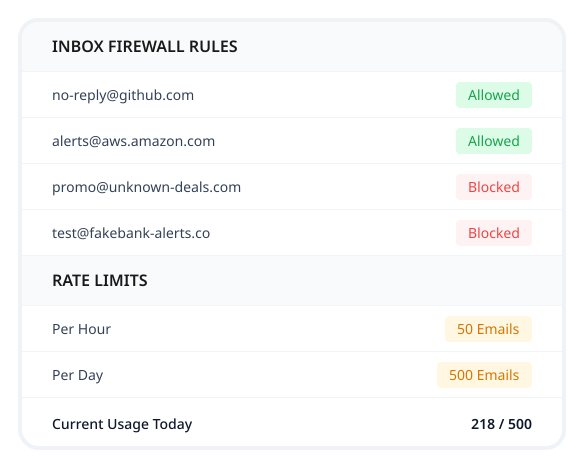
Whitelist senders, block domains, and rate limit — all at the inbox level. Useful for isolating one service's emails during a focused test run or simulating realistic carrier-level rejection.

Allowed & Blocked Rules
Define which domains and email addresses are allowed in and which are blocked. Useful for isolating one service's emails during a focused test or simulating realistic carrier-level rejection behaviour.
Rate Limiting
Set a maximum number of emails per hour or per day. Configurable per inbox — test how your app behaves when the email gateway is throttled, without touching a real provider.
One inbox. The whole team. Real time.

Shared Real-Time Inbox
Every team member sees the same incoming emails simultaneously. The moment one arrives, everyone can connect into it — no refresh, no forwarding, no separate tabs.

Per-Inbox Isolation
Each project gets its own separate SMTP inbox. Staging emails never mix with client rejects, every inbox is a sealed environment from the moment it's created.

Retention Based on Plan
Emails stay in your inbox for as long as your plan allows them. Nothing disappears when someone closes a tab or ends a session.
Built for email testing. Not adapted for it.
A honest comparison. Some tools do some of this. Email Inbox does all of it.
| CAPABILITY | OTHER EMAIL TESTING TOOLS | ZUNOY EMAIL INBOX |
|---|---|---|
SMTP + API support | Varies by tool | Both, same inbox |
HTML rendering preview | Raw source only | Gmail, Outlook, Apple Mail, mobile |
AI-based spam & deliverability scoring | Score on every email | |
Failure simulation (bounces, blocks, delays) | ||
Attachment preview & download | Download only, some tools | Inline preview + download |
Advanced search (sender, subject, date, tag) | Basic keyword search | |
Public share links for any email | No account needed to view | |
Auto-forward rules to real inboxes | ||
Inbox firewall (allow/block senders, rate limits) | ||
Slack / Discord / Teams alerts | Slack only, some tools | Slack, Discord, Teams, Webhooks |
Browser-based, no install | Mobile app only | |
Team role management | ||
Multiple inboxes managed centrally | Per device | One workspace, every environment |
No personal device needed | ||
Part of a full testing suite | Email + SMS + Webhook + TOTP, one account |
Other tools tell you the email arrived. Email Inbox tells you if it was ready to be sent.
The things developers actually ask about Email Inbox
Can I create multiple inboxes for different environments?
Yes. Each inbox gets its own SMTP credentials and API endpoint — spin up as many as you need for dev, staging, QA, or individual client environments.
Does Email Inbox check spam and deliverability, or just capture the email?
Both. Every message is scored across HTML validity, link safety, spam signals, and performance, so you catch deliverability issues before a real user does.
Can my whole team see the same inbox?
Yes. Every teammate with access sees new emails land in real time — no more asking "did it arrive?" over Slack.
Do I need to change my email sending code to use Email Inbox?
No. Point your existing SMTP client or REST API integration at your inbox's credentials — no rewrites, no new SDK.
How long are captured emails kept?
You control retention with configurable cleanup rules, or clear an inbox manually anytime — nothing is kept longer than you want it to be.
Your next email test shouldn't cost a Rupee
Set up your Email Inbox in under five minutes. Point your app at Zunoy's SMTP endpoint. Watch your first test email land instantly.
No SMTP credits needed
No inbox limits to manage
No real users involved - Ever
Free forever on basic plan

Sandbox
Test Email, SMS, Webhooks & 2FA codes without touching production.
Operational
Contact Us On
Mail Us
support@zunoy.comCopyright © 2026 - Mentcube Innovations Pvt Ltd.. All Rights Reserved.