Six ways your Email flow can fail. Test them all before Production.
Inject real failures into your staging inbox — bounces, delays, lost messages, corrupted attachments. Your app receives genuine SMTP error responses. Not a display-side fake. Configured in seconds, active immediately.









WHY FAILURE SIMULATION EXISTS
Production doesn't warn you before it breaks your email flow.
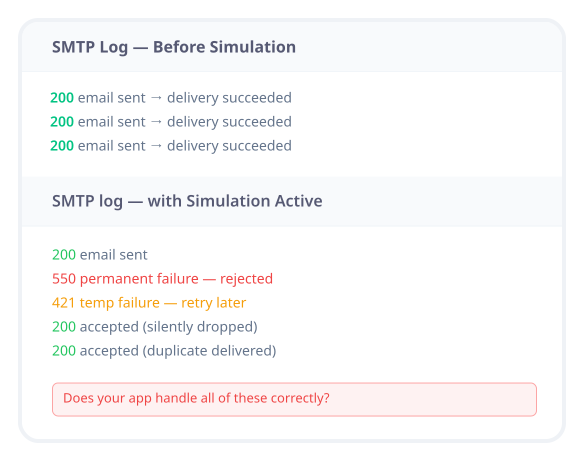
Email sends. Delivery succeeds. User gets the message. Your SMTP logs say 200. Everything looks fine.
But in production, emails bounce silently. Servers return 5xx. Attachments arrive corrupted. Images fail to load on corporate clients.
And if your app has never seen any of these — it hasn't really been tested.
Most email bugs aren't in the sending logic. They're in how your app handles failure.
Configured at the inbox level. Active immediately.
Open your inbox settings, enable Failure Simulation, set your percentages, and save. Every email sent to that inbox is now subject to your simulation rules.
01
Inbox-level configuration
Failure Simulation is configured per inbox — not per email. Set it once on your staging or QA inbox. Every email sent to that inbox follows these rules until you change them.
02
Real SMTP responses
When SMTP Response Failure is active, your app receives genuine 4xx or 5xx SMTP error codes for the configured percentage of emails. These are real responses your system must handle — not display-side simulations.
03
Simultaneous simulation
All six simulation types can run on the same inbox at the same time. Combine latency, SMTP failures, and rendering chaos to stress-test your entire email flow in a single run.
Six ways your email flow can fail. Now testable before production.
Real systems don't fail in one way. They fail in combinations.

Latency Injection
Adds a delay between your app sending an email and it appearing in the inbox.
Does your app handle slow delivery gracefully?
Do loading states and confirmations behave correctly?
Does your system timeout or retry correctly?
Set a delay once — applies to all incoming emails until changed.

SMTP Response Failure
Returns real 4xx or 5xx SMTP error codes to your app for a percentage of emails.
Does your app retry on 4xx responses?
Does it handle 5xx failures without breaking?
Are failures logged, alerted, and handled cleanly?
Select error type and percentage. Both can run together.
Message Loss
A percentage of emails are accepted (your app gets success) but never appear in the inbox.
Does your app assume delivery or verify it?
What happens when users never receive OTPs or confirmations?
Can your system detect or flag missing messages?
Your SMTP server said success. The email never arrived. Most systems don't detect this — until a user reports it.

Duplicate Delivery
Delivers a percentage of emails more than once — just like real-world duplicate delivery.
Does your system handle duplicate emails safely?
Are downstream systems idempotent?
Do duplicate OTPs or confirmations cause issues?
Set the percentage of duplicated emails.

Attachment Corruption
A percentage of emails with attachments arrive with corrupted files.
Does your app validate attachment integrity?
Do templates handle broken files gracefully?
Does your file handling logic fail safely?
Set the percentage of corrupted attachments.

Rendering & Display Chaos
Simulates real-world email client limitations.
Is your email readable without images?
Does layout hold without CSS?
Are alt texts meaningful?
Does the core message still come through?
COMBINING SIMULATIONS
Run everything at once. That's how production fails.
Slow servers, dropped messages, and broken rendering often happen together.
All six simulation types can run on the same inbox at the same time.
Combine latency, SMTP failures, message loss, and rendering chaos — and run your entire test suite against real-world failure conditions in one go.
If your app passes, it's been tested properly.

What teams use Failure Simulation for
Testing Retry Logic
Configure SMTP Response Failure at 30% and run your test suite. Every third email your app sends will receive a genuine 4xx or 5xx response. Does your app retry? Does it notify the right team? Does it recover?
Validating Bounce Handling
Simulate permanent 5xx failures for a percentage of emails and verify your bounce handling logic works as expected — without waiting for a real bounce from a production carrier.
Testing Timeout Behaviour
Set latency injection to 5 minutes and verify that your app doesn't hang indefinitely waiting for delivery confirmation. Test your timeout thresholds under controlled conditions.
QA Sign-off on Email Resilience
Before a production release, run your complete email flow against all six simulation types simultaneously. If every scenario passes QA, your email handling is production-ready.
Testing Email Templates Under Hostile Rendering
Enable rendering chaos to validate that your email templates are still readable and functional when images are blocked and CSS is stripped — before a corporate email client does it to a real user.
The things developers ask about Failure Simulation
Does failure simulation affect real email delivery?
No. Failure Simulation only affects emails sent to your Sandbox inbox. Your production email configuration is completely separate — simulation settings never touch it.
Does my sending app receive real SMTP errors?
Yes — for SMTP Response Failure specifically. Your app receives genuine 4xx or 5xx SMTP error codes for the configured percentage of emails. Every other simulation type affects what Sandbox does with the email after accepting it — your app receives a success response for those.
Can I run multiple simulation types at the same time?
Yes. All six types can be active simultaneously on the same inbox. Configure them independently and they run in parallel on every incoming email.
Is simulation percentage-based for all types?
Yes. Every simulation type — including attachment corruption and rendering chaos — is configurable by percentage. Set any value from 1% to 100%.
How do I turn off a simulation?
Set the percentage to 0% or disable the simulation toggle in your inbox settings. The inbox returns to normal operation immediately.
Test every failure before production finds it for you.
Enable Failure Simulation on any inbox in seconds. Configure percentages, run your test suite, and verify your app handles every scenario correctly.
Six simulation types
All run simultaneously
Real SMTP responses to your app
Free forever on basic plan

Sandbox
Test Email, SMS, Webhooks & 2FA codes without touching production.
Operational
Contact Us On
Mail Us
support@zunoy.comCopyright © 2026 - Mentcube Innovations Pvt Ltd.. All Rights Reserved.