Manage Every Bug With Full Context
Zunoy is a focused bug management tool for dev and QA teams that need to manage bugs from report to closure with clear ownership, bug priority, bug status, severity, attachments, comments, linked bugs, sub-bugs, and workflow visibility.
Keep every issue organized in one bug management software without losing the details developers need to fix faster.

Free to start
No credit card required
Visual Bug Reporting
Multi-channel tracking

Full context from day one.
One Place to Track, Prioritize, and Resolve Bugs
Bug management is the core of Zunoy Bug Tracker. Teams can view bugs, assign owners, update status, add context, follow progress, attach evidence, and connect related issues from a single workspace.
Whether your team works in QA cycles, sprint reviews, release planning, or customer issue queues, Zunoy keeps every bug structured, visible, and easy to act on.

Track bug priority, status, severity, and ownership
Connect linked bugs, sub-bugs, blockers, and duplicates
Use saved tabs and custom filters for faster reviews
Keep comments, files, screenshots, and activity attached
Move every issue through a clear bug lifecycle
Multiple view for every workflow

Table View
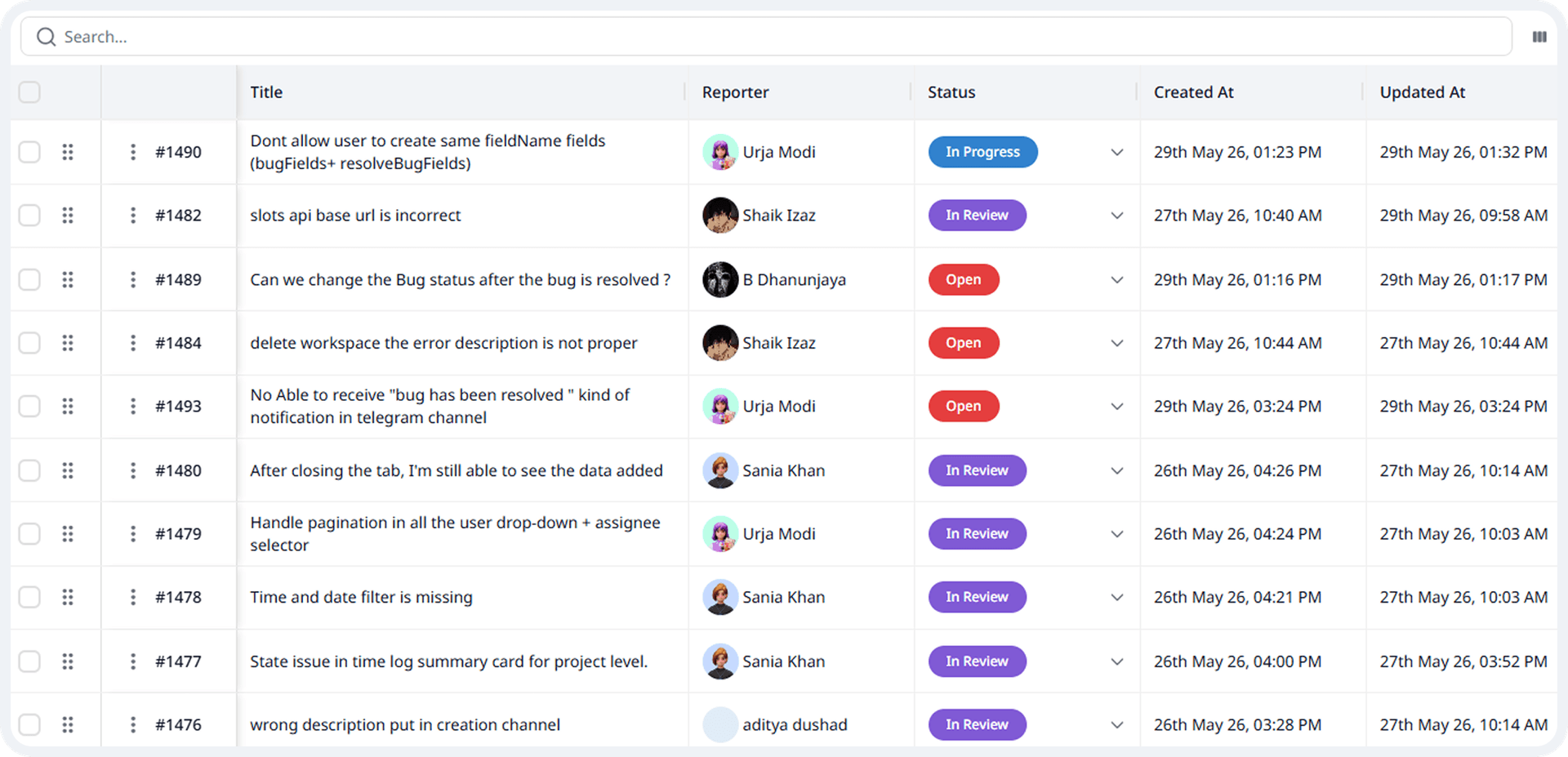
Review bugs in a detailed list with bug status, bug priority, severity, assignee, tags, due dates, and custom fields visible in one place.

Kanban View
Move bugs across lifecycle stages like Open, Triaged, In Progress, Resolved, Reopened, and Closed, so teams can track progress visually.

Card View
Scan bugs quickly during standups, QA reviews, async updates, or priority checks with key issue details shown on each card.
Connect Related Bugs Before They Slow You Down
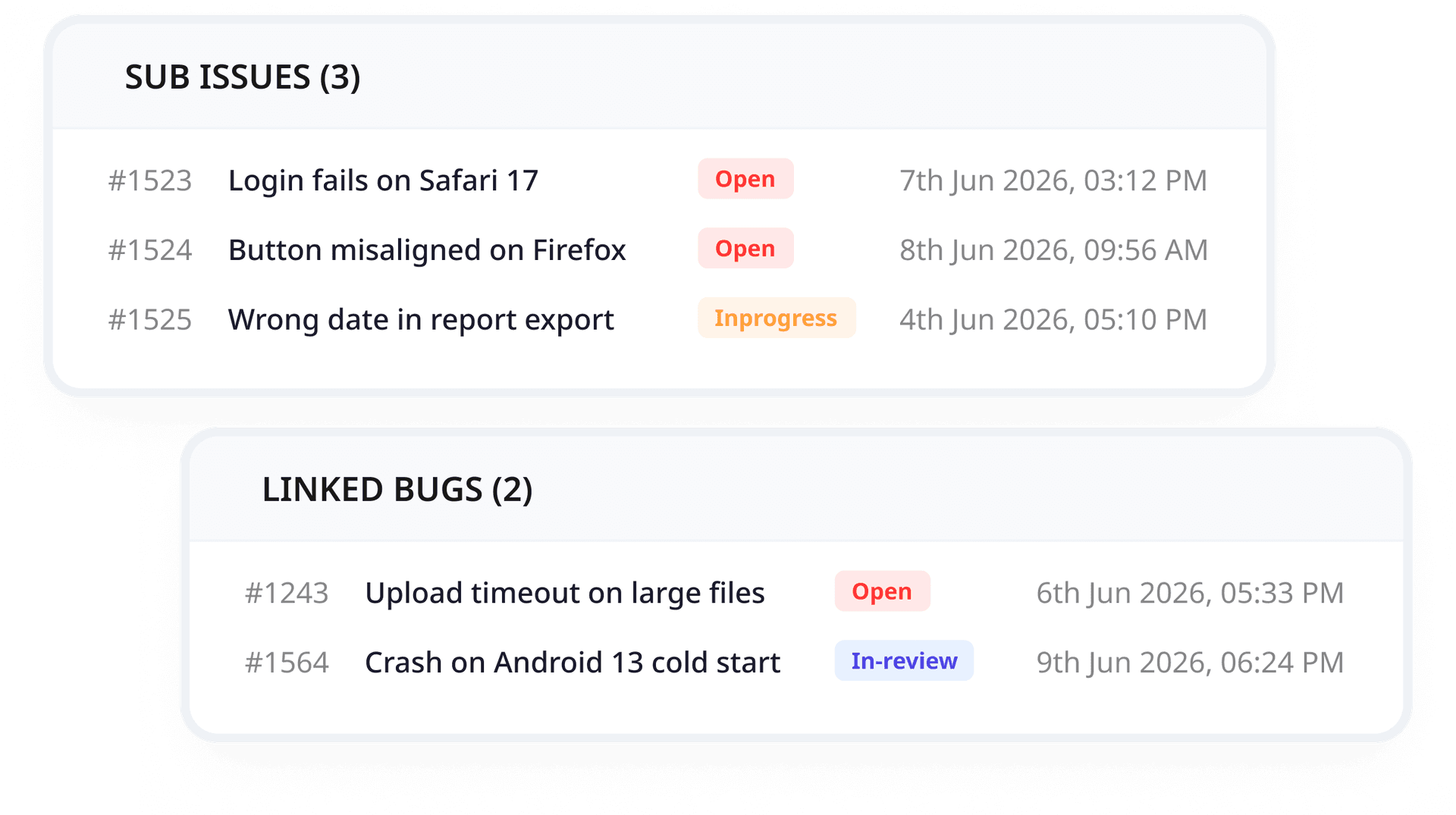
Not every bug exists alone. Zunoy helps teams connect related issues, track duplicates, break complex defects into sub-bugs, and keep dependencies visible before work gets closed.

Linked Bugs
Connect related, duplicate, dependent, or blocked bugs so teams can understand the full issue history before fixing or closing work.

Sub-Bugs
Break larger defects into smaller, trackable bugs with their own owner, bug status, priority, and progress.
CORE CAPABILITIES
Everything Needed for Structured Bug Management
Zunoy brings the core controls of bug management software into one focused workspace, so teams can search, filter, assign, follow, and manage bugs with full context.

Saved Tabs & Custom Filters
Save frequently used bug views by status, priority, assignee, tags, dates, project, release, or workflow stage.

Query Search
Search bug titles, descriptions, comments, tags, fields, and issue details to find the right bug faster.

Bug Metadata & Fields
Track priority, severity, status, assignee, tags, due dates, attachments, and custom fields on every bug

Follow Bugs
Follow important bugs to stay updated on comments, status changes, ownership changes, and progress without becoming the assignee.

Attachments
Add screenshots, logs, files, documents, and supporting evidence directly to the bug report, so developers do not chase missing context.

Bug Assignment
Assign each bug to the right owner and keep responsibility visible throughout the bug lifecycle.
Ready to Move Bugs Out of Spreadsheets?


Capture bugs from 8+ channels
Keep full context attached to every issue
Track the complete bug lifecycle
Give dev and QA teams one focused workflow
Fix Bugs Faster With Better Context
Zunoy gives growing teams and enterprise bug tracker workflows the control they need without turning bug tracking into heavy project management. Manage roles, permissions, workspace access, project access, and audit history while keeping every workflow focused on bugs and issue resolution.
Bug Management Connected to the Full Workflow
Bug Management connects with Zunoy Timesheet, Knowledge Base, and Custom Fields so teams can track effort, document fixes, and customize bug records without leaving the workflow.

Custom Fields
Extend bug records with fields for components, releases, customers, root causes, closure notes, or QA-specific details.

Workspace Management
Manage your bug tracking workspace as your team grows. Create projects, invite members, organize access, and keep development, QA, product, and support teams working inside one controlled environment.

Team & Access Management
Control who can view, create, edit, assign, verify, or close bugs. This helps teams collaborate without giving every member the same level of access across every project.
The things Developers actually ask.
What is a maintenance window?
A maintenance window is a scheduled period where monitoring checks pause during planned updates or fixes, preventing false downtime alerts.
Can I notify customers in advance?
Yes. If you choose to make maintenance public, it can be shown on your status page so customers know what’s planned.
Can I control which services are included?
Yes. You choose which monitors pause during the maintenance window, while unaffected services continue to run normally.
Start Tracking Bugs With Full Context
Use Zunoy to capture visual, context-rich bug reports from anywhere, assign ownership clearly, and move every issue from report to verified fix.rly, and move every issue from report to verified fix.
Setup in seconds
Capture full bug context
Assign clear ownership
Timesheet included
Free tier available
WORKFLOW
See Bug Management in Action
Use this mockup gallery to show how bugs move through Zunoy’s bug tracking management workflow, from list review to detail view, status movement, linked issues, and closure.

Bug Tracker
Zunoy Bug Tracker helps dev and QA teams capture visual, context-rich bug reports.
Operational
Contact Us On
Mail Us
support@zunoy.comCopyright © 2026 - Mentcube Innovations Pvt Ltd.. All Rights Reserved.