Coordinate Incident Response Like a Team
Incidents don’t wait—and neither should your team. Get notified the moment something breaks. Assign the right people, post real-time updates, and fix issues faster—without breaking your flow.

Why Alerting Alone Isn’t Enough for Engineering Teams

Automated Incident Creation
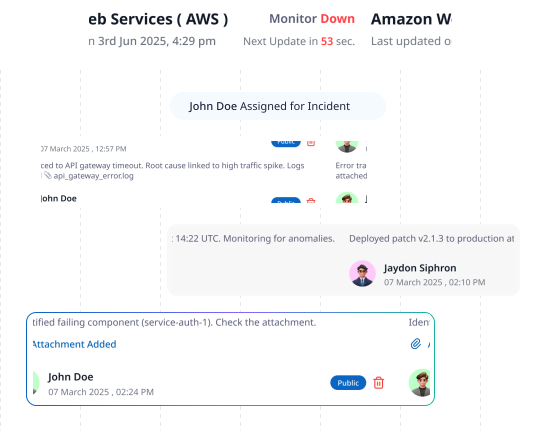
Monitor failures instantly generate incidents with detailed logs and metrics. Assign owners fast and resolve issues before users even notice downtime.

Unified Collaboration Hub
Replace scattered chats and endless threads with a central hub for comments, severity updates, and assignee tracking—all synced to your existing tools.

Prevent Repeat Outages
Turn chaos into clarity. Add root cause, full timelines, and postmortems to strengthen responses and reduce the risk of repeat issues.


SMS

Voice call

Slack

Zapier

Telegram
Webhooks

Discord

Microsoft Teams
Never miss a Downtime Notification Again
Seamlessly connect your uptime alerts to the tools you already use. With native apps and webhook support, get notified instantly — via Slack, Telegram, Email, or any custom system — so your team stays in sync without lifting a finger.
Share Incidents Publicly—Only When You Want To
Give your users a dedicated section on the status page for incident updates—without losing control. Enable or disable incident visibility entirely, and decide for each comment whether it’s public or private.
Control Visibility: Enable or disable public incident sharing instantly—no commitments.
Flexible Privacy: Mark updates as public (for customers) or private (internal notes)—no accidental oversharing.
Clear Communication: Give customers the right detail at the right moment.
Available on Android and iOS. Monitor Your Uptime.
Download Our App for Any Devices



Frequently Asked Questions
How are incidents created?
Incidents are generated automatically when one of your monitors fails
Can I assign incidents to team members?
Yes. Assign owners instantly so everyone knows who’s responsible. You can also reassign as priorities shift.
What if I don’t want incidents visible on my status page?
You decide what’s shown. Turn incident visibility off entirely, or keep it on and choose which comments are public and which stay private.
Can multiple team members collaborate on the same incident?
Of course. Add multiple assignees, comments, and attachments—everyone sees updates in real time, so no one is left out of the loop.
Can incidents sync with our existing tools (Slack, Jira, etc.)?
Yes. Monitor down can trigger notifications in Slack, Teams, email, or through webhooks to your existing ticketing systems.
Ready to Experience Zunoy?
Start your journey with Zunoy’s powerful suite of tools, designed for startups, developers, and growing teams alike.

Uptime
Monitor websites & APIs with instant alerts and shareable status pages.
Operational
Available On


Contact Us On
Mail Us
support@zunoy.comCopyright © 2026 - Mentcube Innovations Pvt Ltd.. All Rights Reserved.