Create a public status page in minutes — no setup headaches
Launch beautiful, real-time status page in minutes. Keep users informed, reduce churn, and cut support tickets during downtime.
Real-World Reasons Teams Publish Status Pages

Show We’re Always On
Display consistent uptime across services to build user trust and confidence—even before they hit “Sign Up” or “Subscribe.

Reduce Support Load
Preempt basic queries like “Is your system up?” with real-time service health. Fewer tickets, faster answers, happier users.

Close Bigger Clients
Enterprises demand transparency. A live status page signals operational maturity and helps you stand out in security/compliance reviews.
Everything You Need in a Status Page—Already Built In
From uptime transparency to brand control, everything’s configured your way. No designers or developers needed.
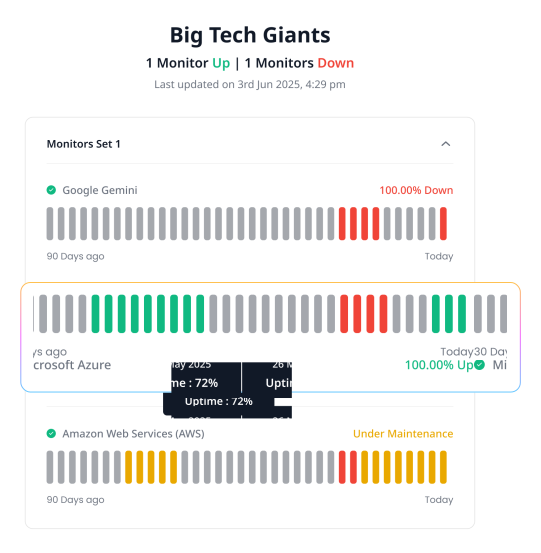
Monitor List Preview
Incident Preview
Control What’s Shown
Choose exactly which updates to share—detailed logs for your team, high-level summaries for customers.
Live Updates
Post real-time progress as you fix issues—give customers peace of mind in real-time.
Private or Public
Make incidents visible to everyone—or just your team, clients, or beta testers.
Automatic Incident Tracking
Incidents are auto-created and resolved when checks fail or recover—zero manual effort.
Incident History & Transparency
Every outage creates an incident—automatically. Share real-time updates while fixing the issue, add postmortems after it’s resolved, or keep it private. You stay in control of what gets shared and when.
Branded Status Pages that Feel Like an Extension of Your Product

Your Logo & Style
Show your brand, not ours. Upload your logo, pick a theme, and add social icons. Your status page should reflect your identity—not a default template

Use Your Own Domain
Host your status page on your own domain or subdomain like status.yourcompany.com.

Fully White-Labeled
Remove all Zunoy branding. No “powered by” tags, no distractions—just your company front and center, as it should be.
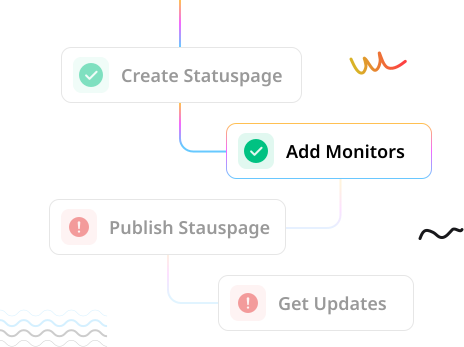
Launch Your Status Page under 5 Minutes
Create & Secure Your Page
Customize with your brand—colors, logo, and domain (like status.yourcompany.com). Choose who sees it: public, private, or password-protected.
Add Your Monitors
Select which monitors to display and organize them into groups for a clean, user-friendly view of your system’s health.
Go Live Instantly
Publish with one click. Share the link via email, Slack, or embed it in your website.
Frequently Asked Questions
Do I really need a status page?
Even 99.9% uptime means over 8 hours of downtime every year. If users ever ask, “Is your service down?”, a public status page answers them before they open a support ticket. It’s one of the simplest ways to improve user experience.
What will my users actually see?
Only what you choose. You control what’s public—like your API uptime or app health—and hide anything internal. Whether you want a minimalist look or detailed logs, it’s fully up to you.
Will this page update on its own, or do I have to manage it?
Yes, it auto-updates. If a monitor goes down or comes back up, your status page reflects it instantly. You can also add manual updates like “We’re on it” to keep users in the loop.
Can I use my own domain like status.mycompany.com?
Yes. Use your own subdomain like status.yourcompany.com, and fully white-label the page to match your brand.
Do I need to be technical to set this up?
Nope. If you know how to fill a form and click “publish,” you’re good to go. It takes less than 5 minutes.
Ready to Experience Zunoy?
Start your journey with Zunoy’s powerful suite of tools, designed for startups, developers, and growing teams alike.

Uptime
Monitor websites & APIs with instant alerts and shareable status pages.
Operational
Available On


Contact Us On
Mail Us
support@zunoy.comCopyright © 2026 - Mentcube Innovations Pvt Ltd.. All Rights Reserved.